(Un)blocking invoices for payment (Multivers / Boekhoud Gemak)
Written By Tess Hoogeboom
Last updated 3 months ago
When you use the Entry before confirmation feature in TriFact365, the invoices will be blocked for payment when booked in Unit4 Multivers. These invoices are unblocked after the confirmation workflow in TriFact365 is completed. Read below how it works.
Note!
Make sure there are no invoices with the status Confirmation. If this is the case and you turn on Entry before confirmation, these invoices will NOT be sent to Exact Online.
Go to Settings (Cogwheel) and click on Administrations. Check the box Entry before confirmation for the relevant administration and click Save.
Click on the Three dots → Edit at the line of the relevant administration and go to the tab Entry settings.
Select a payment condition at the setting Payment condition for Entry before Confirmation.

The journal entries will be made with this payment condition. When an invoice has been confirmed in TriFact365, the payment condition will be changed to the condition set for this journal entry.
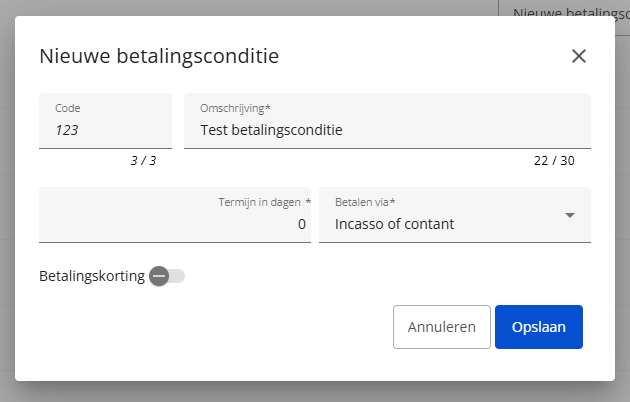
Create a payment condition in Multivers / Boekhoud Gemak
Create a payment condition in Multivers / Boekhoud Gemak with Termijn in dagen in dagen set to 0. This payment condition can then be used to block bookings for payment.
Note
Do NOT change a payment condition on a journal entry in Unit4 Multivers when using Entry before Confirmation. TriFact365 will do this for you when the invoice has been confirmed.
Related articles
Was this helpful?
Still need help? Ask the team