Error message: Kan boeking niet blokkeren voor betaling. Er is geen betalingsconditie geselecteerd in de instellingen van administratie
No payment condition has been selected in the company settings for Post before approval. Here's how to fix it.
Last updated 8 days ago
You see this error message when TriFact365 wants to block an entry for payment, but no payment condition has been selected in the company settings.
Kan boeking niet blokkeren voor betaling. Er is geen betalingsconditie geselecteerd in de instellingen van administratie: X
Cause
The Post before approval feature requires a payment condition in the company settings. This payment condition has not been selected yet.
Solution
Click
•••→ Edit next to the company, or double-click the row.Open the Entry settings tab.
Select the Payment condition for 'Post before approval'.
Click Save.
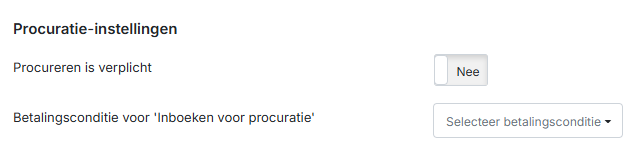
You can only choose payment conditions with the payment method Kas (Exact Online) or Termijn in dagen 0 (Multivers / Boekhoud Gemak). Is there no suitable payment condition in the company? Then first create one in the accounting package. Read more in:
Still seeing this error message? Contact our support department via chat or create a support ticket.
Was this helpful?
Still need help? Ask the team