Credit note / reverse entry processing in AFAS Profit
How to process a credit note or reversal entry in AFAS Profit via TriFact365, and which settings you need in AFAS.
Written By Kristian van Dijk | TriFact365
Last updated 8 days ago
In AFAS Profit, you correct an invoice in one of two ways:
Credit note: a new invoice that offsets the original one. The supplier then has two entries that cancel each other out.
Reversal entry: the original entry is reversed with a negative amount, without a new credit note.
Process a credit note
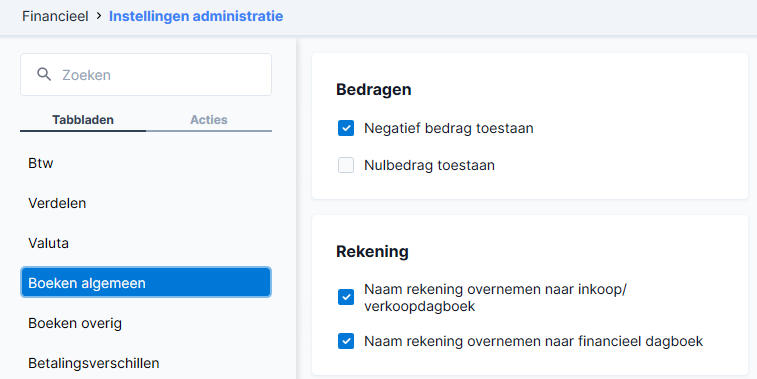
In AFAS Profit, go to Financieel → Instellingen administratie (company settings), tab Boeken algemeen (general posting), and select Negatief bedrag toestaan (allow negative amount).
In the TriFact365 Check screen, select Credit note. Keep the amounts positive.
Process a reversal entry
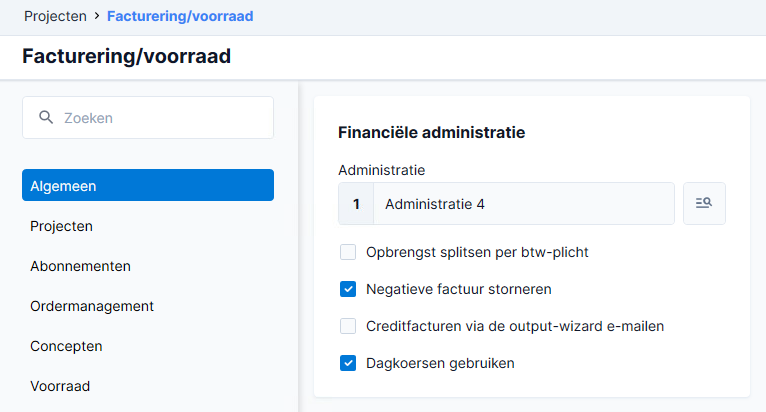
In AFAS Profit, go to Projecten → Facturering/voorraad (invoicing/stock), tab Algemeen (general), and select Negatieve factuur storneren (reverse negative invoice).
In the Check screen, put a minus sign in front of the amount excl. VAT on each entry line. The VAT amount and the total then automatically become negative as well.
Do not use the Credit note checkbox and the minus sign together. They cancel each other out.
Related articles
Viewing the PDF in AFAS Profit
Was this helpful?
Still need help? Ask the team