Posting to dossiers (Multivers / Boekhoud Gemak)
How to post to a dossier from Multivers / Boekhoud Gemak in TriFact365, using the Cost unit column.
Last updated 9 days ago
In Multivers / Boekhoud Gemak, you can post an entry line to a dossier. In TriFact365, a dossier is called Cost unit. You turn on the Cost unit column yourself in the display options.
Show Cost unit on the entry lines
Open a document in the Check screen.
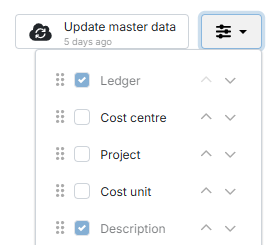
Click the display options icon at the top right, below the blue bar.
Select Cost unit.
The Cost unit column is now shown on the entry lines. Choose the dossier for each entry line there.
Do you use all three dimensions? Then turn on Entry lines under document. The entry lines then use the full width of the screen, below the PDF viewer, so you have more space.
Related articles
Notes for the Multivers / Boekhoud Gemak connection
Connect with Multivers / Boekhoud Gemak
Was this helpful?
Still need help? Ask the team