Viewing the PDF in Exact Online
How to find the PDF of an entry in Exact Online.
Written By Tess Hoogeboom
Last updated 8 days ago
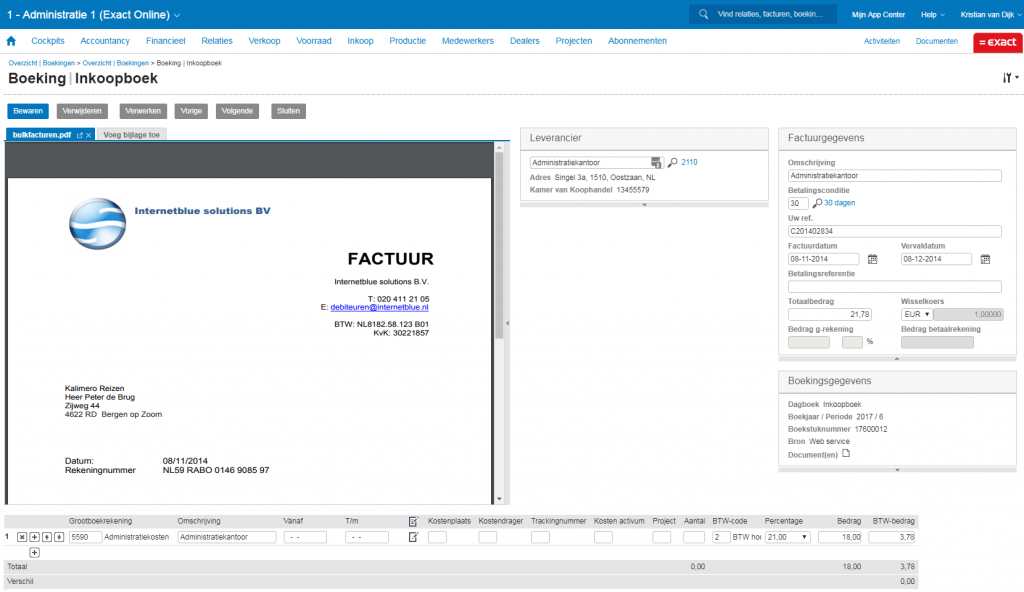
When making a journal entry in Exact Online, TriFact365 will automatically send the corresponding PDF along. Follow the next steps to view the PDF in Exact Online.
In Exact Online go to Financieel → Boekingen en grootboekrekeningen → Boekingen → Overzicht.
Click on the right hand side on the number of entries to be processed next to the relevant Journal.
Click the entry number of the relevant entry. The entry then appears with the PDF, as shown below.
Make sure the rights of the Exact Online user you are connected with are set correctly.
Log on to Exact Online with the correct user. In the top right corner of the blue bar go to your User Name and select Mijn Exact Online. In the menu on the left go to Rechten. Make sure that Documenten aanmaken, bijwerken en verwijderen is checked.
Was this helpful?
Still need help? Ask the team