Viewing the PDF in Multivers / Boekhoud Gemak
How to set up Multivers / Boekhoud Gemak so you can open the PDF of an entry from TriFact365.
Written By Tess Hoogeboom
Last updated About 5 hours ago
TriFact365 automatically includes a link (URL) with an entry to Multivers / Boekhoud Gemak. To open this link, a setting in Multivers / Boekhoud Gemak is required.
Setting up the rubrieken
In Multivers, go to Onderhoud → Algemene gegevens → Document rubrieken.
Click Nieuw.
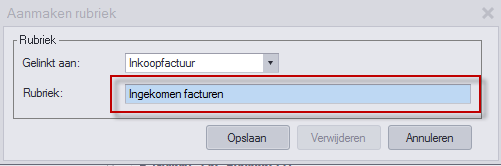
Fill in the rubriek for the type of invoice:
Purchase invoices: under Gelinkt aan, select Inkoopfactuur and in the Rubriek field, enter Ingekomen facturen.
Sales invoices: under Gelinkt aan, select Verkoopfactuur and in the Rubriek field, enter Algemeen.
The rubriek is case sensitive. Ingekomen facturen must start with a capital I and Algemeen with a capital A.
Viewing invoices from Multivers / Boekhoud Gemak
You can view invoices from Multivers / Boekhoud Gemak if you post them after setting up the rubrieken.
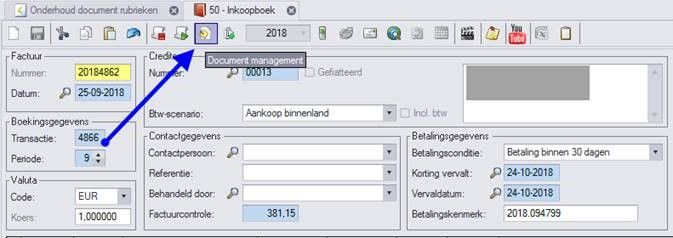
In Multivers, open a purchase invoice.
Click Document management. The corresponding invoice opens in TriFact365.
Was this helpful?
Still need help? Ask the team