Viewing PDF in Multivers / Boekhoudgemak
Written By Tess Hoogeboom
Last updated 3 months ago
TriFact365 automatically provides a URL (hyperlink) with a journal entry to Multivers / Boekhoudgemak. To open this link, the correct setting in Multivers / Boekhoudgemak are required. Follow the steps below:
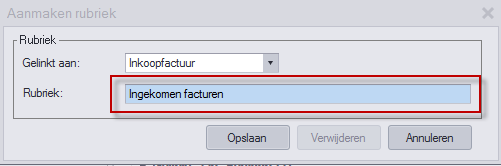
In Multivers, go to Onderhoud → Algemene gegevens → Document rubrieken and click on Nieuw.
Purchase invoices: Select Inkoopfactuur under Gelinkt and enter in the field Rubriek, Ingekomen facturen.
(Note: Case sensitive! Ingekomen must start with a capital I)Sales invoices: Select Verkoopfactuur under Gelinkt and enter in the field Rubriek, Algemeen.
(Note: Case sensitive! Algemeen must start with a capital A)
Viewing invoices in Multivers / Boekhoudgemak
All invoices sent after setting the Rubrieken, can be viewed in Multivers / Boekhoudgemak.
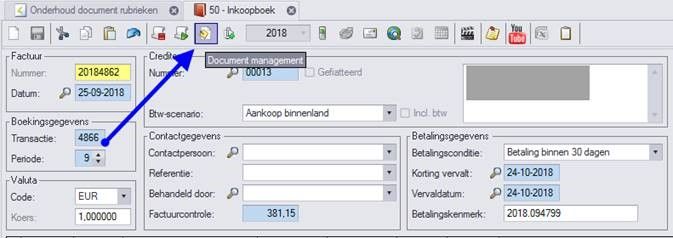
When you open a purchase invoice in Multivers, you will see the Document management button. This will open the corresponding invoice in TriFact365.
Note
As far as we know, Multivers online has this as a standard feature. However, with Multivers server, an extra module (Document Manager) is required, which has to be purchased from Multivers. This extra module must also be enabled and accessible for the user to be able to use the function.
Was this helpful?
Still need help? Ask the team