Connect with Exact Online
How to connect TriFact365 to Exact Online and which user rights you need.
Written By Tess Hoogeboom
Last updated 13 days ago
With a connection to Exact Online, you post documents from TriFact365 directly to your companies. While connecting, you log in to Exact Online.
Only an Administrator can create a connection.
Create the connection
Go to Settings (cogwheel) → Connections and click New.
Select Exact Online as the accounting package.
Choose the version of Exact Online: the Netherlands, Belgium, Germany or Spain.
Enter a description so you can recognise the connection later. Click Next.
Click Finish. You are taken to the Exact Online login page. Log in and click Login.
The connection is now set up. You can immediately add one or more companies from the connection. Read how in Add a company.
User rights in Exact Online
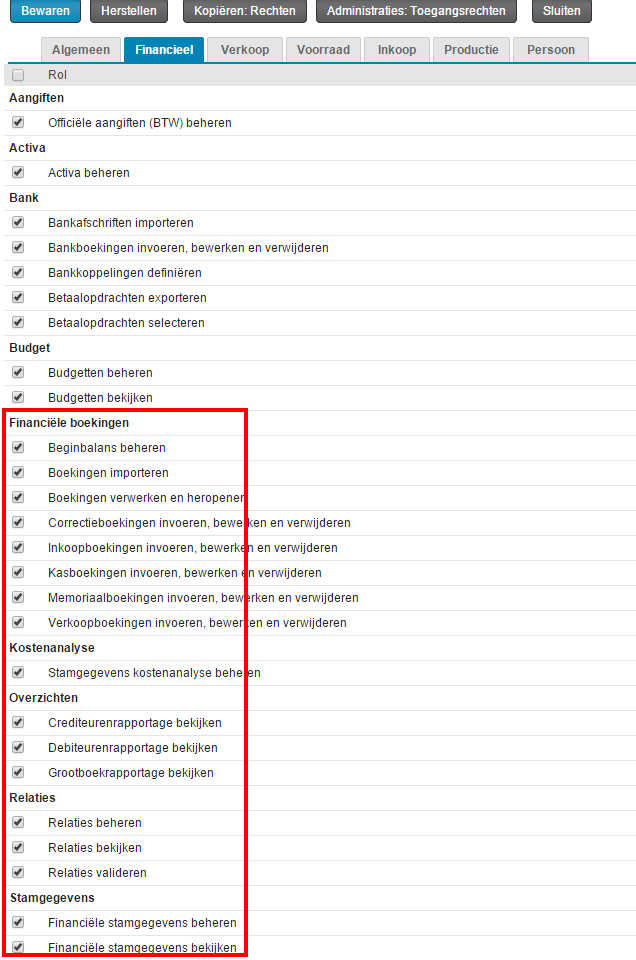
Connect with a user who has access to the companies you want to add to TriFact365. Without the right permissions, TriFact365 works only partly: for example, you cannot edit suppliers and the drop-down lists for ledger account, cost centre and project stay empty. The user needs these rights:
Related articles
Notes for the Exact Online connection
Was this helpful?
Still need help? Ask the team