Automatic line recognition
Written By Tess Hoogeboom
Last updated 20 days ago
Settings
Using automatic line item recognition, the line items on invoices can be automatically broken down in the posting proposal. You can easily enable this feature via the Administration settings.
In TriFact365, go to Settings (Cogwheel) > Accounts and double-click on the administration.
Go to the Settings tab and set Automatic Line Recognition to YES.

Check and process
Once TriFact365 has recognised and validated the various lines on an invoice, an automatic proposal with multiple journal entry lines will be presented. The following information is copied from the invoice:
Line description
Amount (excl. VAT)
VAT
Amount (incl. VAT)
Ledger and automatic line recognition
Do you use automatic line recognition and have a default general ledger account set at relation level? If so, this general ledger account will be suggested automatically, even if the proposed entry consists of multiple lines.
If no default general ledger account has been set, TriFact365 will make a suggestion based on the posting history. This is done on a line-by-line basis.
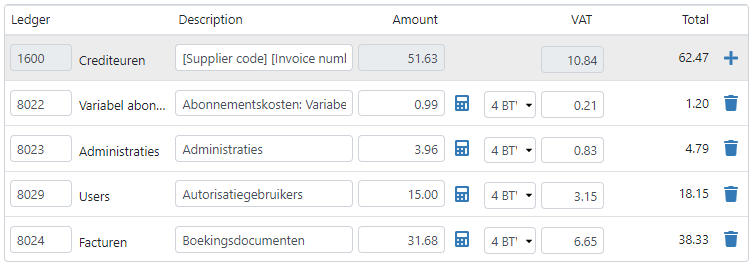
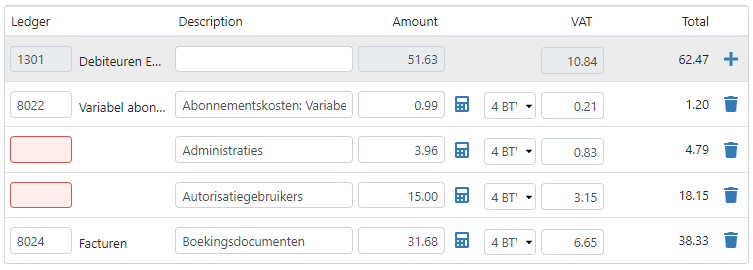
If multiple lines are recognized, but TriFact365 can only make a suggestion for some of the lines? Then the remaining lines are marked in red. By filling these in yourself, TriFact365 can learn from this for future proposals.
Merge entry lines
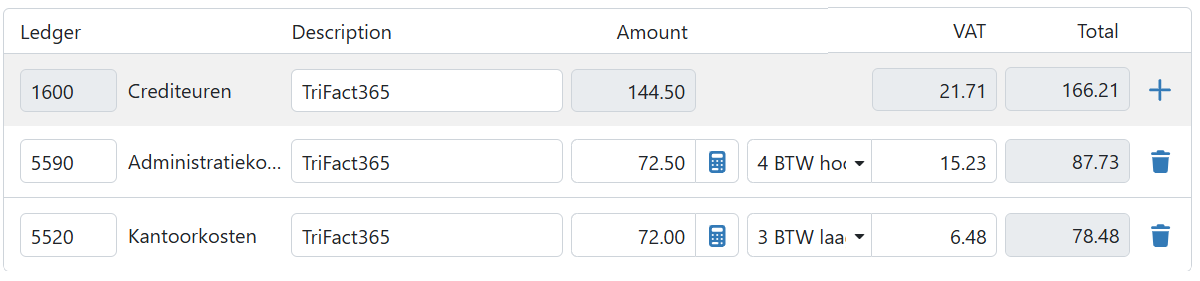
Don’t want to process the invoice as separate entry lines? Then you can use the Merge entry lines checkbox. Posting rules with the same VAT rate are now merged into a single entry.
Tip!
Set per supplier whether the posting rules should be merged automatically. You can find this setting in the supplier’s master data.
Related articles
Was this helpful?
Still need help? Ask the team