Error message: Wisselkoers – Moet groter zijn dan: 0 (Exact Online)
Exact Online rejects the entry because of an exchange rate setting or date. Here's how to fix it.
Written By Tess Hoogeboom
Last updated 9 days ago
You see this error message in TriFact365 when you post a document. The message comes from Exact Online.
Wisselkoers – Moet groter zijn dan: 0
This error message can have two causes.
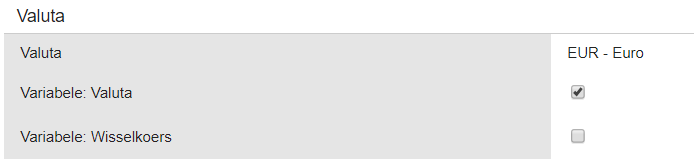
Cause 1: The journal has a variable exchange rate
In Exact Online, the Variable: Exchange Rate setting is enabled for the journal. To fix this:
In Exact Online, go to Administration → Master Data → Journals.
Select the journal you want to post to.
Clear the Variable: Exchange Rate check box.
Cause 2: The exchange rate date is after the invoice date
In Exact Online, the date of the exchange rate is after the invoice date of the invoice you are posting. To fix this:
In Exact Online, go to Financieel → Analyse en resultaten → Valuta → Wisselkoersen.
Check the date of the exchange rate.
Make sure this date is not later than the invoice date.
Still seeing this error message? Contact our support department via chat or create a support ticket.
Was this helpful?
Still need help? Ask the team