Viewing PDF files in Visma eAccounting
Written By Tess Hoogeboom
Last updated 4 months ago
When making a journal entry in Visma eAccounting, TriFact365 will automatically send the corresponding PDF along. Follow the next steps to view the PDF in Visma eAccounting.
Purchase invoices
Go to Visma eAccounting and log in.
Go to Inkoop > Inkoopfacturen. Click on the Paperclip next to the relevant invoice to open the PDF.
Sales invoices
Go to Visma eAccounting and log in.
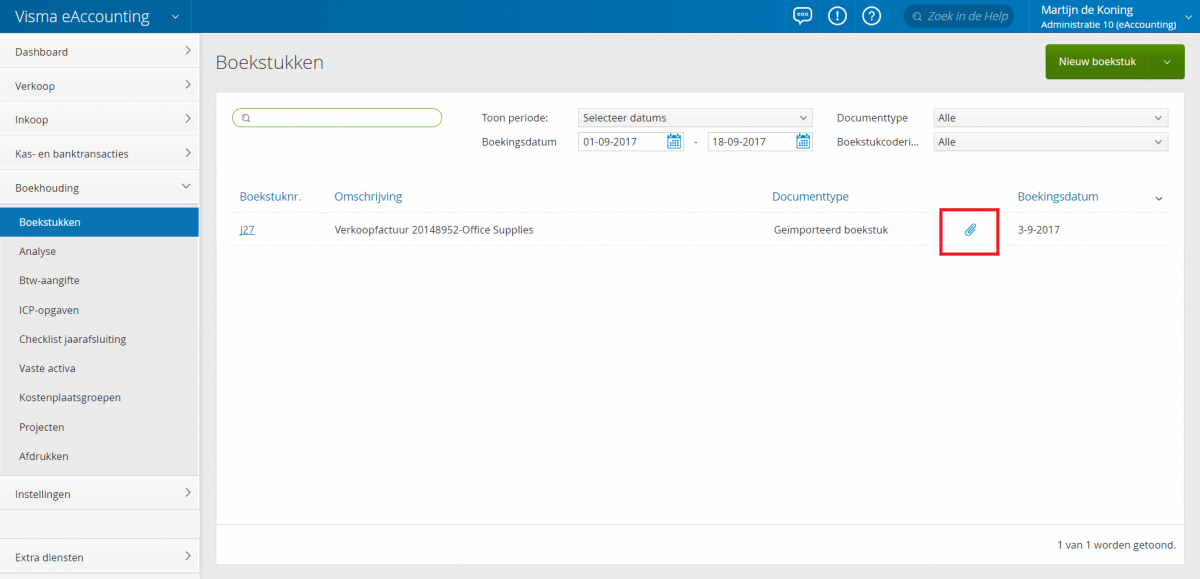
Go to Boekhouding > Boekhoudstukken. Under Documenttype, select the Geïmporteerd boekstuk option. Click on the Paperclip next to the relevant invoice to open the PDF.
Was this helpful?
Still need help? Ask the team