Credit invoice / reverse entry processing in AFAS
Written By Kristian van Dijk | TriFact365
Last updated 4 months ago
Processing a Credit Invoice in AFAS
A credit invoice is a corrective invoice in which the debit entry is offset by a credit entry. So 100 credit becomes 100 debit. On balance, there is then 100 debit (credit) and 100 credit (debit) on the balance sheet.
Settings in AFAS
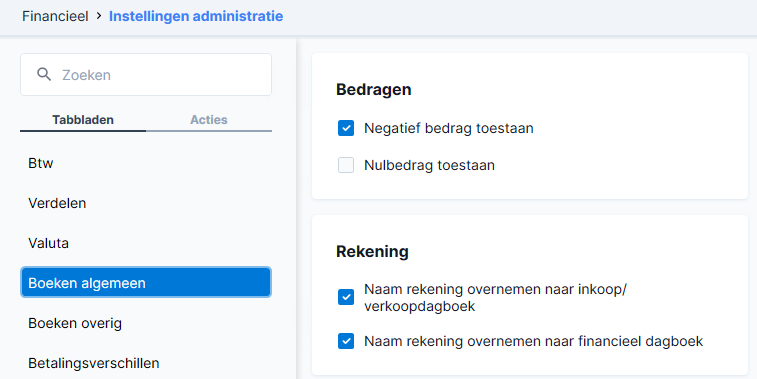
Make sure you have checked “Allow negative
amounts” in AFAS (see screenshot below)
Processing a credit invoice via the posting screen
If you want to process a credit invoice in AFAS using TriFact365, you must check the “Credit Invoice” option in the posting screen. The invoice will now be posted as a credit invoice in AFAS.

Processing a reversal entry in AFAS
A reversal is a corrective invoice in which the debit entry is offset by a debit entry with a negative (-/-) amount in front of it. On balance, there is then a debit (or credit) of 0 (zero) on the balance sheet. In payment transactions, a reversal is the reversal of a direct debit. You can therefore view a reversal as the reversal of an invoice WITHOUT a new credit invoice being issued.
Settings in AFAS
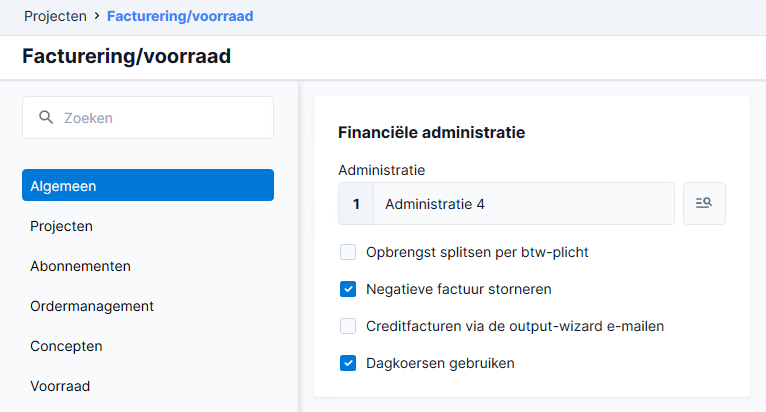
Make sure you have checked “Reverse negative
invoice” in AFAS (see screenshot below)
Processing a reversal entry via the posting screen
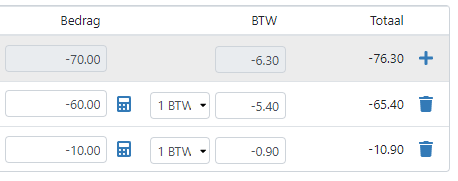
If you want to process a reversal entry in AFAS using TriFact365, you must enter a minus sign in front of the amounts on the posting lines in the posting screen. The invoice will now be processed as a reversal entry in AFAS.
Was this helpful?
Still need help? Ask the team