Upload by email
How to email invoices to TriFact365, set the document type via the subject, and which files you can email.
Written By Tess Hoogeboom
Last updated 10 days ago
You can email purchase and sales invoices to TriFact365. Each company has its own unique email address.
Find the email address of the company
Find the company.
Look in the Mailbox column. It shows the email address of the company.
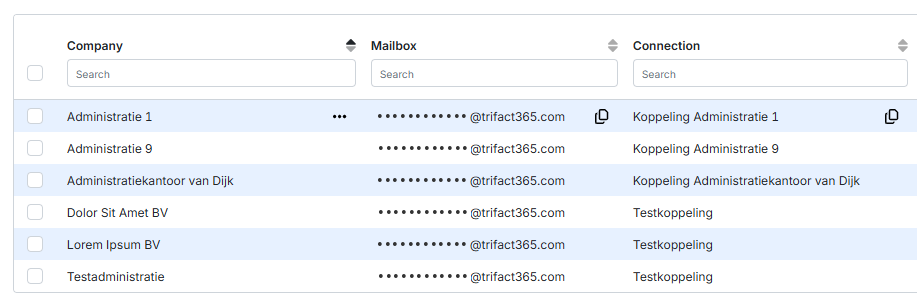
TriFact365 creates the email address automatically. You can’t change it.
Document type via the subject
Start the subject of the email with one of these words to set the document type. Upper or lower case doesn’t matter.
For example: with the subject Verkoop invoice 2026-014, the PDF becomes a sales invoice. Read more about splitting in Splitting documents.
Files and size
Accepted file formats: .bmp, .doc, .docx, .gif, .jpg, .jpeg, .pdf, .png, .tif, .tiff, .xls, .xlsx and .xml.
An email with attachments may be up to 10 MB. An Office file (.doc, .docx, .xls, .xlsx) may be up to 4 MB. Your accounting package may also have its own limit.
You can email a UBL invoice (.xml) with or without a PDF. If you send them together, give them the same file name. Without a PDF, TriFact365 creates a document based on the UBL invoice. See Upload UBL invoices.
Images in attachments are processed. Images in the body of the email are not, so logos and icons from your signature are not uploaded. If signature images are attached anyway, they are only processed if they are larger than 200 pixels.
Do you want to process the same invoice in two companies, for example as a purchase invoice in one and a sales invoice in the other? Then send two separate emails. An email to two addresses at once only arrives in one company.
Forward emails automatically
Do you want invoices to be forwarded automatically from your own mailbox? See Set up automatic email forwarding.
Frequently asked questions
An invoice I emailed is not in the work queue. What now?
An invoice I emailed is not in the work queue. What now?
Check in Received emails whether the email has arrived. If the attachment could not be processed, you see the reason there. Do you see a message that the SPF check failed? Then read Error message: SPF check failed when uploading an email.
Related articles
Upload by email: Disable authentication of sender
Was this helpful?
Still need help? Ask the team