Tips for setting up an approval scheme
How to set up an approval scheme that fits the route of your documents, with four examples.
Written By Tess Hoogeboom
Last updated About 5 hours ago
How you set up an approval scheme depends on the route a document needs to take. That differs per organisation. Below you read which choices you have, with four common examples.
Stages
The stages in the workflow determine the order in which documents are approved. A document first goes through stage 1. Once that stage is complete, it moves on to stage 2, and so on. A workflow has up to 5 stages.
Does the order not matter, and can approvers review the document at the same time? Then place all approvers in the same stage.
All users or One user
Is there more than one user in a stage? Then choose under Mandatory acceptance by:
All users: all users in this stage must approve.
One user: one of the users in this stage must approve.
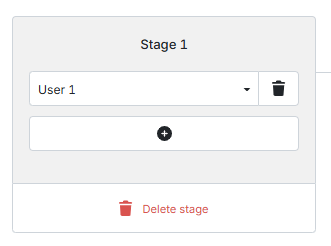
Example 1: one approver
One person must approve the document. Place that user in stage 1.
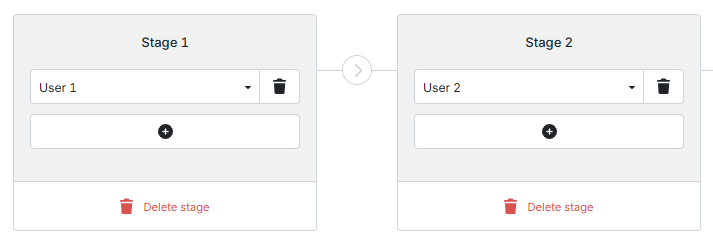
Example 2: multiple approvers, one after the other
User 1 approves the document first, then user 2. Place user 1 in stage 1 and user 2 in stage 2.
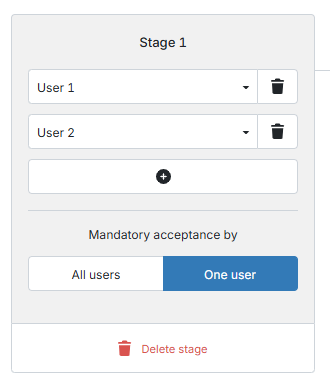
Example 3: multiple approvers, one approval is enough
Several people may approve the document, but approval by one of them is enough. Place them all in stage 1 and choose One user.
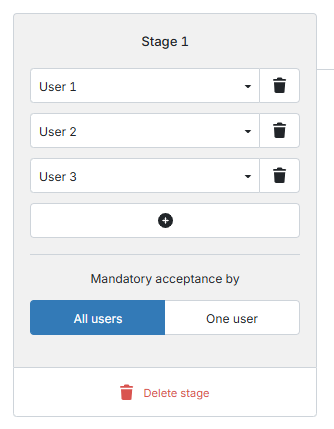
Example 4: multiple approvers, all must approve
Several people must approve the document, in any order. The document moves on once all of them have approved it. Place them all in stage 1 and choose All users.
Not sure how best to set up your approval scheme? Contact our support department via chat or create a support ticket. We are happy to help.
Related articles
Create and set up approval schemes
Was this helpful?
Still need help? Ask the team