Display options
How to choose which columns you see in the overviews, and how the review screen looks.
Written By Tess Hoogeboom
Last updated 9 days ago
With the display options, you decide what you see in the overviews and in the Check screen. This way, you set up the screens to suit the way you work.
Display options in the overviews
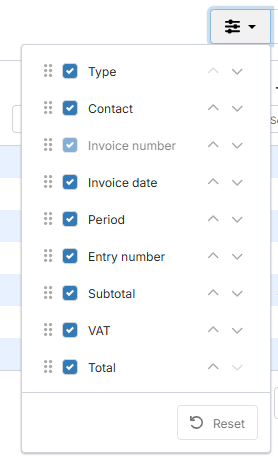
In every overview, you decide which columns you see.
Open the overview.
Click Display options at the top right.
Turn the columns on or off. Columns you turn off are no longer shown in the overview.
Column order and width
In the overviews and for the entry lines in the Check screen, you can change the order and width of the columns.
Change the order
Drag the column header to the left or right.
Or open Display options and drag the column to the right place. You can also use the up and down arrows.
Change the width
Move the mouse to the edge of the column header.
Hold down the mouse button.
Drag the edge to the left or right.
Display options in the Check screen
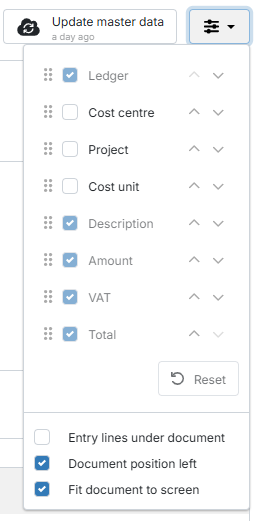
In the Check screen, click the Display options icon at the top right, below the blue bar.
Cost centre, Project, Cost unit
Depending on your accounting package, you can turn dimensions on or off. If you don’t use a dimension, turn it off; the Description field then becomes wider. If you use several dimensions, TriFact365 suggests placing the entry lines below the document.
Entry lines under document
The entry lines then use the full width of the screen, with a larger Description field. You can then also adjust the height of the PDF viewer.
We recommend this option if you work with more than three dimensions.
Document position left
The document is then shown on the left of the screen instead of the right. This option is off by default.
Fit document to screen
The document is then reduced by default so that the whole page fits on your screen. You don’t have to do this yourself in the PDF viewer each time.
Entry lines under document, Document position left and Fit document to screen are personal settings. They only apply to you.
Related articles
Was this helpful?
Still need help? Ask the team