Automatic line recognition
How to turn on automatic line recognition, so TriFact365 proposes the invoice lines as separate entry lines.
Written By Tess Hoogeboom
Last updated 6 days ago
With automatic line recognition, TriFact365 splits the lines on an invoice directly into separate entry lines in the entry proposal. You turn this on in the company settings.
Settings
Click
•••→ Edit next to the company, or double-click the row.Open the Entry settings tab.
Set Automatic line recognition to Yes.
Click Save.

Check
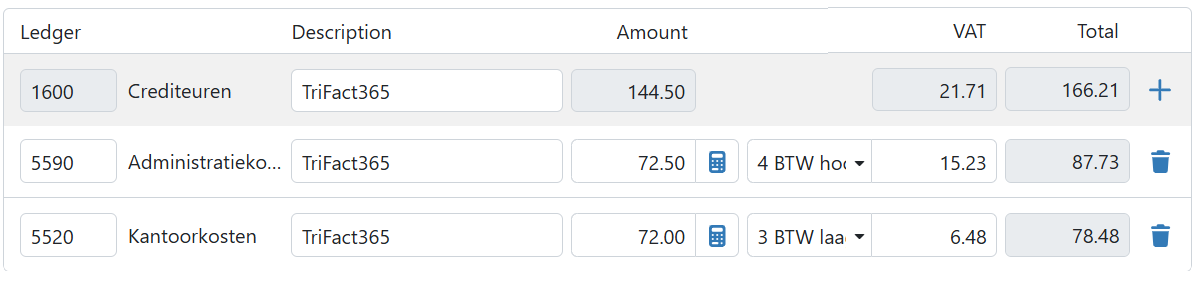
Once TriFact365 has recognised and validated the lines on an invoice, you see them automatically in the entry proposal. TriFact365 copies this information from the invoice:
Line description
Amount (excl. VAT)
VAT amount
Amount (incl. VAT)
Ledger account and automatic line recognition
Do you use automatic line recognition, and is a default ledger account set for the supplier or customer? Then TriFact365 suggests this ledger account automatically, also when the entry proposal has several lines.
Is no default ledger account set? Then TriFact365 makes a suggestion for each line, based on previous entries.
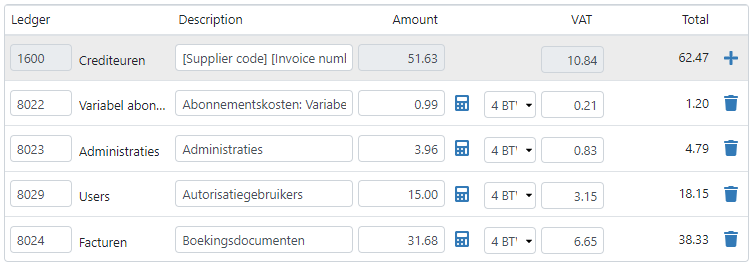
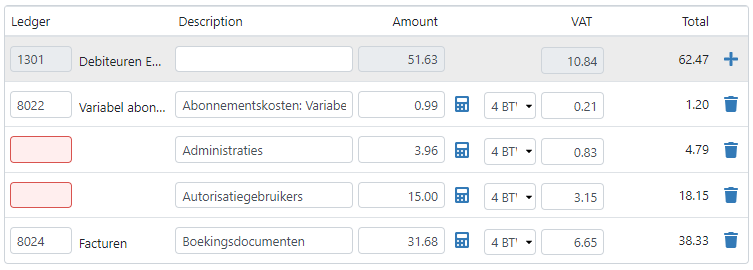
Does TriFact365 recognise several lines, but can it only make a suggestion for some of them? Then TriFact365 marks the other lines in red. Fill them in yourself. TriFact365 learns from this and makes better suggestions for future entry proposals.
VAT code and automatic line recognition
With automatic line recognition, TriFact365 also suggests a VAT code for each line. If a default VAT code is set for the supplier or customer, TriFact365 uses it on the lines with the same VAT rate. Otherwise, the VAT code comes from the recognition.
Merge entry lines
Don’t want to process the invoice as separate entry lines? Then select Merge entry lines. TriFact365 then merges the entry lines with the same VAT rate into one line.
You can set for each supplier whether TriFact365 merges the entry lines automatically. You find this setting in the master data of the supplier.
Related articles
Was this helpful?
Still need help? Ask the team