Home
On Home you see the work queue of all your companies, documents awaiting authorisation and approval, overviews and notifications at a glance.
Written By Tess Hoogeboom
Last updated 15 days ago
Do you work with multiple companies? Then Home is your start screen. Here you see the documents to be processed in all your companies in one place.
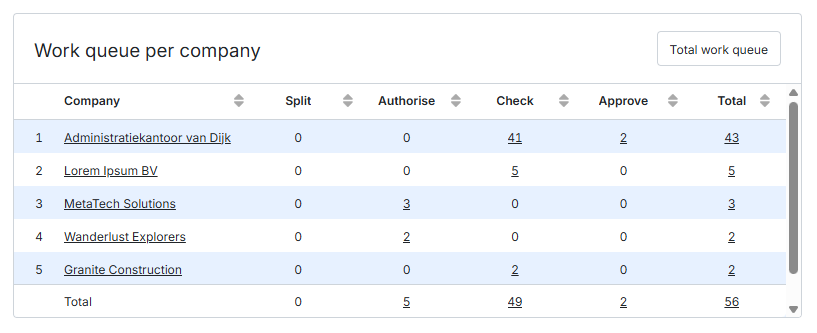
Work queue per company
This table shows the 50 companies with the most documents to be processed, broken down by the statuses Split, Authorise, Check and Approve. The bottom row shows the totals for all companies.
Click a company name to open the Overview | Current company screen of that company.
Click a number to open the Work queue of that company, filtered on that status. A number in the Total column opens the work queue without a status filter.
Click a number in the bottom row to open All documents to be processed for all companies, filtered on that status. The number in the Total column of the bottom row shows all documents to be processed, without a status filter.
Click Total work queue at the top right to see the full overview for all companies.
Documents awaiting authorisation and approval per user
These two tables show for each user how long documents have been waiting for authorisation or approval: 0-7 days, 7-14 days, 14-30 days and 30+ days. The bottom row shows the totals for all users.
Click Authorisation overview or Approval overview to see all documents awaiting authorisation or approval.
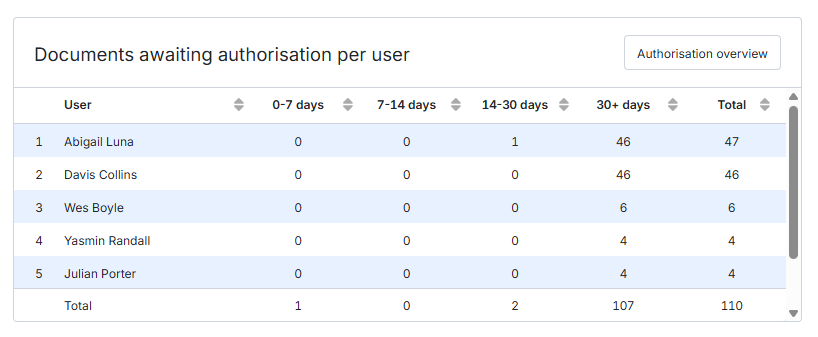
Only an Administrator can see Documents awaiting authorisation and approval per user.
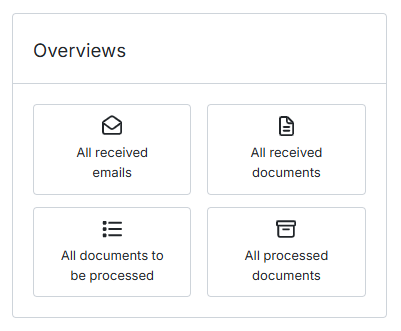
Overviews
Depending on your user rights, you can open these overviews:
All received emails
All received documents
All documents to be processed
All processed documents
Notifications
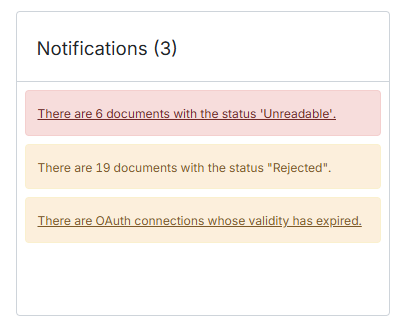
On the right, you see important notifications, for example about rejected documents, blocked connections or connections that have expired. Click a notification to go to the place where you can solve it.
Related articles
Authorisation and approval overview
Was this helpful?
Still need help? Ask the team