Assigning users to companies
Assign a user to one or more companies, via the company or via the user.
Written By Tess Hoogeboom
Last updated About 11 hours ago
A user only works in the companies that are assigned to them. You assign users via the company or via the user; the result is the same.
Only an Administrator can assign users to companies.
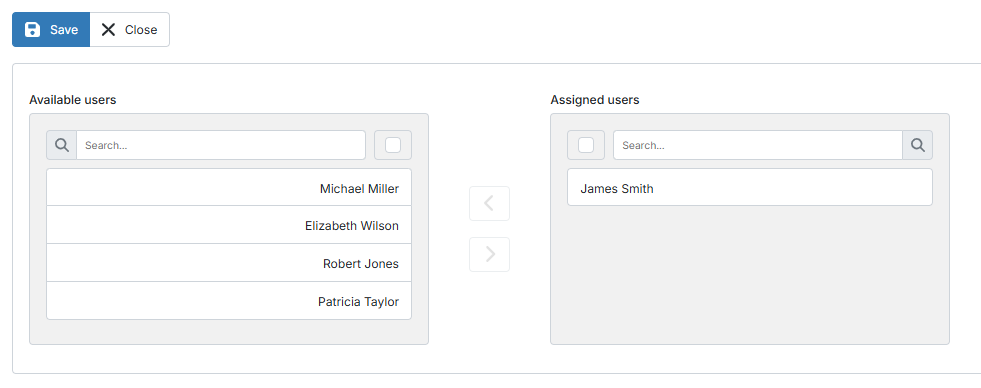
Via the company
Double-click the company or click
•••→ Edit.Go to the Users tab.
Select one or more users under Available users and click the arrow
>. The users are now listed under Assigned users.Click Save.
Via the user
Go to Settings (cogwheel) → Users.
Double-click the user or click
•••→ Edit.Select one or more companies under Available companies and click the arrow
>. The companies are now listed under Assigned companies.Click Save.
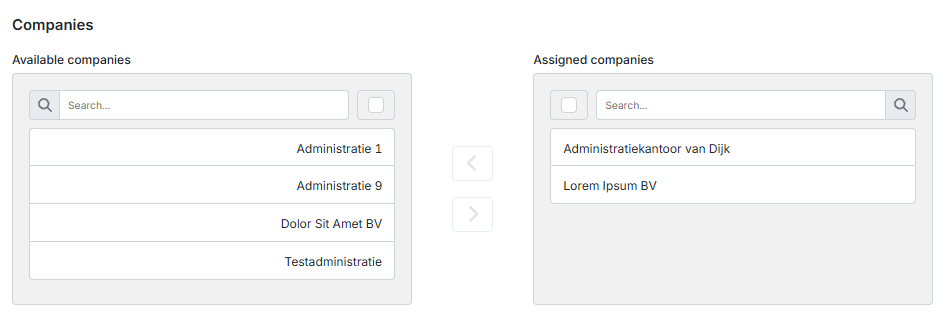
To remove an assignment, select the user or company under Assigned users or Assigned companies and click the arrow <. Then click Save.
Related articles
Was this helpful?
Still need help? Ask the team