Set a default payment reference
How to set a default payment reference for the company or for each contact, and where to find it in your accounting package.
Written By Tess Hoogeboom
Last updated 5 days ago
With a default payment reference, the payment reference is filled in automatically on the entry you send to your accounting package. You set it for the company or for each contact. You do this with labels.
This setting is only available for AccountView, AFAS Profit, Exact Online, Multivers / Boekhoud Gemak and Twinfield.
Payment reference for the company
Click
•••→ Edit next to the company, or double-click the row.On the Entry settings tab, fill in Default payment reference for purchase invoices and Default payment reference for sales invoices. Under Select label, choose which entry details make up the payment reference. You can also type normal text around them.
Click Save.

Payment reference for a contact
You can also set a default payment reference in the master data of a contact. In the Check screen, click the pencil icon next to the contact and fill in the Payment reference field. You can use labels here too.
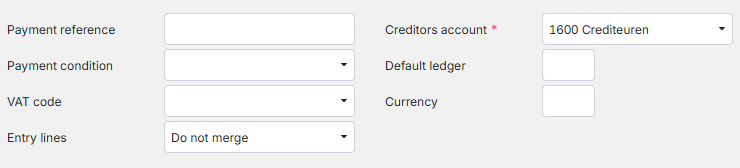
The payment reference is then filled in on the entry automatically. You can also enter it yourself or copy it from the document.
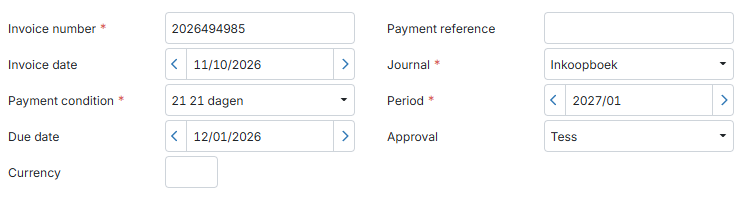
Have you set a payment reference for both the company and the contact? Then TriFact365 uses the one of the contact.
Labels
A label belongs to a field in the Check screen. When you send the entry to approval or to the accounting package, TriFact365 replaces the label with the value in that field. Labels only work between square brackets. You can use these labels:
[supplier code]
[supplier]
[customer code]
[customer]
[invoice number]
[invoice date]
[month]
[period]
For example: [invoice number] becomes 20230107. You use the same labels for the default invoice description; see Set default descriptions for invoices.
Payment reference in your accounting package
Where you find the payment reference depends on your accounting package.
AccountView
AccountView
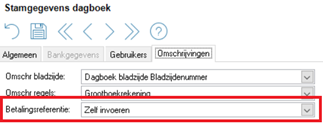
In AccountView, the payment reference is in the Payment reference field. Check the journal setting:
In AccountView, go to Document → Administration Master Data → Journals and select the journal.
Under Payment reference, select Self enter/Manually.
TriFact365 can then send the payment reference to AccountView.
AFAS Profit
AFAS Profit
In AFAS Profit, the payment reference is in the Payment Reference field. This field may only contain digits. Read more about payments with a payment reference on the AFAS support page.
Exact Online
Exact Online
In Exact Online, the payment reference is in the Payment Reference field, in the invoice details. Don’t see the field? Add it with the Edit button at the top right of the screen.
Multivers / Boekhoud Gemak
Multivers / Boekhoud Gemak
In Multivers / Boekhoud Gemak, the payment reference is in the Reference creditor field.
Twinfield
Twinfield
In Twinfield, the payment reference is in Free text field 2. To use it, configure this setting:
In Twinfield, go to Settings → Company settings → Transaction types → Purchase Invoice or Sales Invoice.
Set Free text field 2 to Allowed, Header.
Do you also want to use the payment reference for payments? Then also configure this:
In Twinfield, go to Cash & Banks → Formats → Select payment file.
Fill in Free text field 2.
Related articles
Creating and modifying contacts
Set default descriptions for invoices
Was this helpful?
Still need help? Ask the team