Archive
The Archive contains all documents and entries you have processed via TriFact365.
Written By Tess Hoogeboom
Last updated 14 days ago
The Archive contains all documents and entries you have processed via TriFact365. They are kept for as long as your subscription runs. Useful if your accounting package does not store the PDF with the entry: you can always find the invoice in the Archive.
Open the Archive
Go to Archive in the menu for the archive of the current company.
On Home, under Overviews, click All processed documents for the archive of all your companies.

The newest entry is at the top, sorted on invoice date. You can filter and sort on all columns.
View or download a document
View: click
•••→ View in the Invoice number column or double-click the row.Download: click
•••→ Download.
Actions in the toolbar
Refresh: reload the table.
Delete: delete the selected entries and documents from the Archive. They are only deleted from TriFact365, not from your accounting package. This cannot be undone.
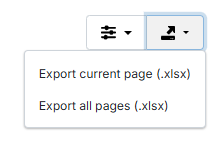
Export (on the right): download the table as an Excel file.
Frequently asked questions
Can I export the entire Archive at once?
Can I export the entire Archive at once?
Yes, on request we export the Archive for you: an overview of the entries and a folder with all PDF files. This costs €80 excl. VAT per 10 companies. Read more in Data export.
How long do documents stay in the Archive?
How long do documents stay in the Archive?
For as long as your subscription runs. If you cancel your subscription, you no longer have access to the Archive. If you delete a company, you also delete the Archive of that company.
How do I switch to the Archive of another company?
How do I switch to the Archive of another company?
Use the Company switcher: click the company in the blue menu and choose another company. Or open the All processed documents tile on Home for the archive of all your companies.
Related articles
Was this helpful?
Still need help? Ask the team