Company details
View and change the company details, email addresses and direct debit authorisation of your TriFact365 subscription.
Written By Tess Hoogeboom
Last updated 10 days ago
As the Owner, you manage the details TriFact365 uses for your subscription and for the invoices you receive from us.
Only the Owner can view and change the account details.
Change company details
Go to User icon → Account details.
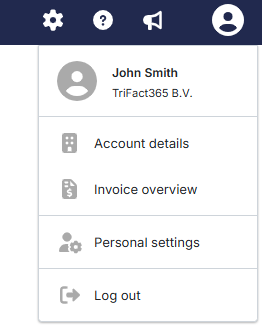
Open the Company details tab.
Change the fields.
Click Save at the top.
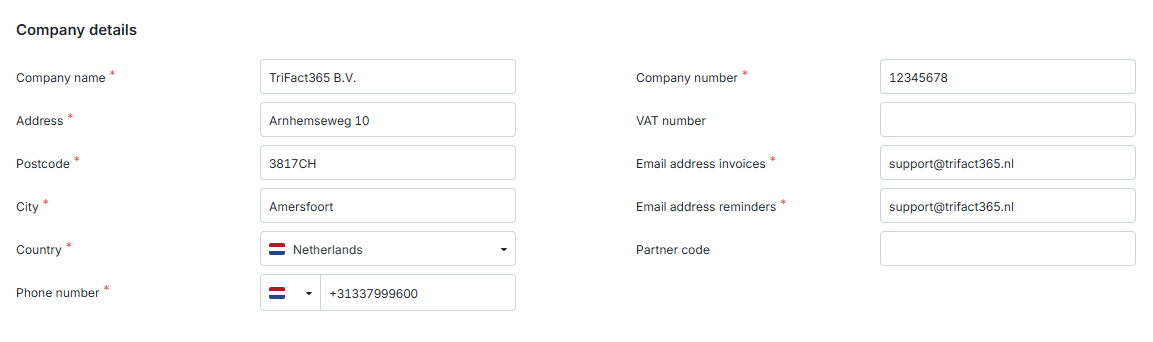
What is on this tab?
Company details: the name and address of your company.
Customer number: your customer number at TriFact365. It is also shown on our invoices.
Email address invoices: the email address where you receive the invoices from TriFact365.
Email address reminders: a separate email address for payment reminders, if you want to receive them elsewhere.
Direct debit authorisation: the IBAN from which TriFact365 collects the subscription. The direct debit takes place within 14 days of receiving the invoice. Here you change the IBAN, or issue a direct debit authorisation if you have not done so yet.
Related articles
Was this helpful?
Still need help? Ask the team