Subscription details
How to view your subscription, purchase a paid subscription and cancel or change it.
Written By Tess Hoogeboom
Last updated 10 days ago
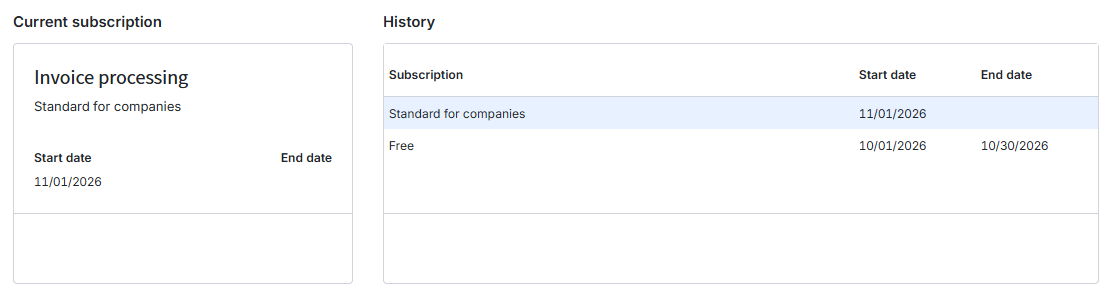
As the Owner, you see your current subscription and, if there are any, your previous subscriptions.
Only the Owner can view and change the account details.
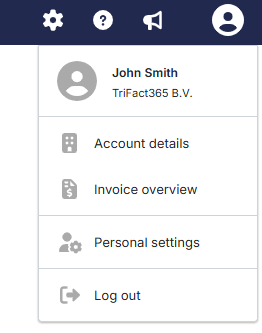
Go to User icon → Account details.
Open the Subscription details tab.
Are you using a trial? Then you can also purchase a paid subscription here with Buy.
Frequently asked questions
How can I cancel my subscription?
How can I cancel my subscription?
Contact our support department via chat or create a support ticket. Please include:
your customer number
the reason for cancellation
the desired end date of the subscription
Only the Owner can cancel the subscription.
What is my notice period?
What is my notice period?
The term of the Standard and Plus subscriptions for companies is 1 month. We renew the subscription automatically. The notice period is 1 month.
The term of the Standard and Plus subscriptions for accountants is 3 months. We renew the subscription automatically. The notice period is 3 months.
View our Terms and Conditions.
How can I change my subscription?
How can I change my subscription?
Does your subscription no longer suit you? Contact our support department via chat or create a support ticket. Include your customer number.
My account has been blocked. What should I do?
My account has been blocked. What should I do?
TriFact365 collects the monthly invoices by direct debit. Sometimes the direct debit authorisation has expired, or the payment has not been made for another reason. We then send you a reminder by email. If we receive the payment in time, you can keep working with TriFact365. If we do not receive a payment, we block the account. If you pay afterwards, we automatically unblock the account within 1 to 2 working days.
Was this helpful?
Still need help? Ask the team