Received documents
Written By Tess Hoogeboom
Last updated 4 months ago
Note
This functionality is only available to Administrators.
Administrators can view all received documents within an administration. The Received documents screen functions as a delivery history, so you can always see if and when documents have been delivered. The Administrator can see which documents have been delivered by whom, when and how, and whether the documents have been successfully uploaded.
Use the menu to go to Inbox → Received documents to open the screen. Here all documents received as of 1 March 2024 are shown.
Note!
Documents that were included as attachment(s) in an email but could not be processed are not displayed here. These can be viewed under Received e-mails.
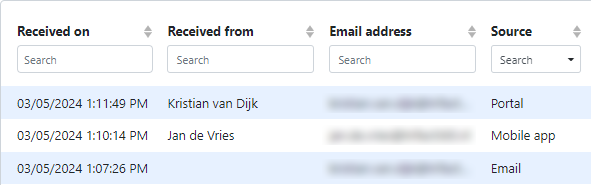
The left-hand side of the table shows when and from whom the documents were received. Also shown here is whether the document was received via the portal, e-mail or mobile app. In the case of an e-mail, no User is known and the Received from column remains empty.
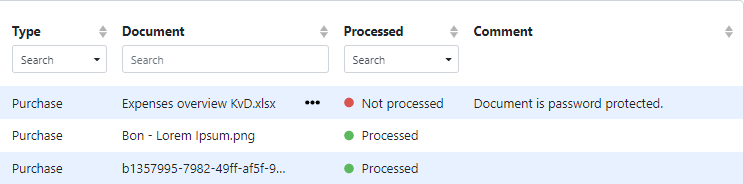
The right-hand side of the table shows the type and file name. Right click the document allows you to download the received document.
The Processed column shows whether the document was processed successfully. If the document could not be processed, the Comment column shows the reason why.
Note
The following remarks may be displayed:
Cause is unknown
Document is password protected
Document is corrupted
Document is too large
Document contains too many pages
Conversion to PDF failed
The DPI of the document is too high
Note
This screen is for consulting received documents and how they were delivered. Edits to a document after uploading are NOT shown here.
Related articles
Was this helpful?
Still need help? Ask the team