Calculating in the amount fields
How to calculate in the Amount and VAT fields, and how to convert an amount incl. VAT to excl. VAT.
Written By Tess Hoogeboom
Last updated 11 days ago
You can calculate in the Amount and VAT fields of an entry line in the Check screen. With the VAT calculator, you convert an amount incl. VAT to excl. VAT.
Calculate in an amount field
You can add (+), subtract (-), multiply (*) and divide (/). Type the calculation in the field and press Enter or Tab, or click outside the field. You then see the result straight away.
For example, type 12.50*4 in the Amount field, and after Enter it shows 50.00.
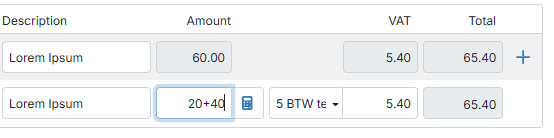
Convert an amount incl. VAT
The Amount field must always contain the amount excl. VAT. Has the amount incl. VAT been recognised? Then convert it with the VAT calculator:
Click the calculator icon next to Amount.
TriFact365 converts the amount using the VAT rate of the VAT code on that entry line. The VAT field is recalculated.
Click the icon again to undo the conversion.
Related articles
Was this helpful?
Still need help? Ask the team